

Finance
See how much money is coming in and going out of the business, and review the full transaction ledger behind those numbers.
Overview
A dashboard summarizing earnings, payouts, and refunds recorded from your completed orders, with a trend chart over time.

.png)
WHAT YOU CAN DO HERE?
Explore the business at a glance.
Date range filter - Last 7 days, Last 30 days,Last 90 days, Last 12 months, or All time.
Earnings - revenue recognized in the selected range (recorded the moment an order is marked paid).
Payouts - amount paid out to affiliates in the range.
Refunds - amount returned to learners in the range.
Net revenue - earnings minus payouts and refunds.
Trend chart - earnings vs. payouts vs. refunds plotted over the selected range.

How do I do it?
A simple path from login to insight.
1
Choose a date range at the top.
2
Review the Earnings/Payouts/Refunds/Net figures and the trend chart.
3
Open Transactions for the full itemized list behind these totals.
Transactions
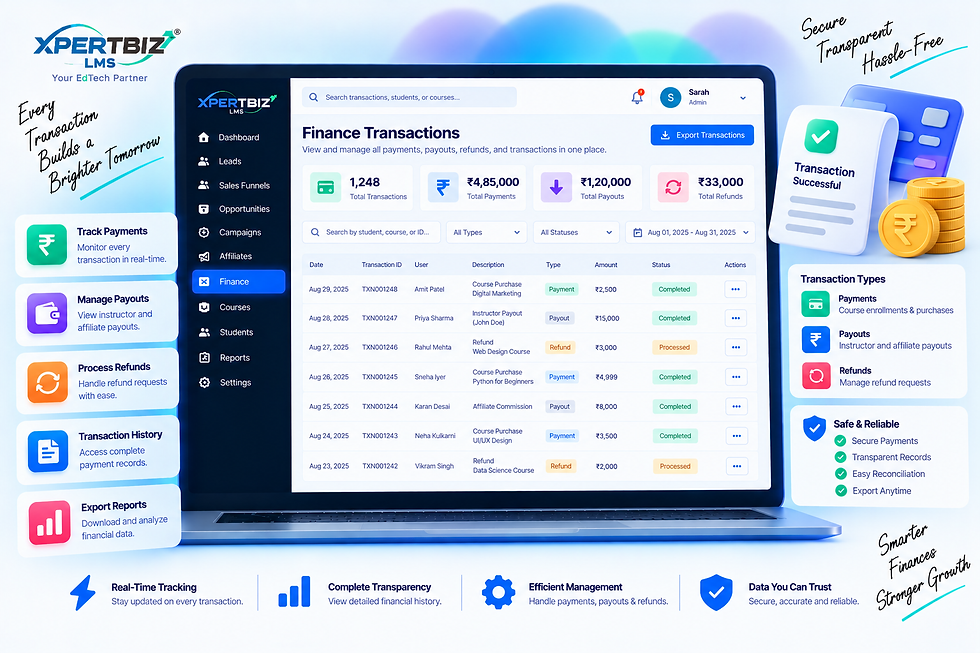
The full, filterable ledger of every earning, payout, refund, and adjustment, each linked back to its source order.
WHAT YOU CAN DO HERE?
Explore the business at a glance.
Type filter - All types, Earnings, Payouts,Refunds, Adjustments.
Table columns - Date, Type, Description,Status, and Amount (payouts/refunds are shown as negative).
Export CSV - download the currently filtered list.
Pagination - 25 transactions per page.
How do I do it?
A simple path from login to insight.
1
Choose a transaction type to filter by (or leave it on All types).
2
Scroll or page through the ledger to review individual transactions.
3
Click Export CSV to download the filtered list.
COMPLETE FINANCIAL CONTROL
Track Every Rupee. Understand Your Business Better.
Stay on top of your financial performance with a clear view of earnings, payouts, refunds, net revenue, and every transaction.
01
Know Your Revenue
Monitor earnings over a selected period and understand how your financial performance is changing over time.
02
Every Payment in One Place
Review your complete transaction history, including payments, payouts, and refunds.
03
Turn Numbers Into Insights
Compare earnings, payouts, refunds, and net revenue through clear financial trends and reports.